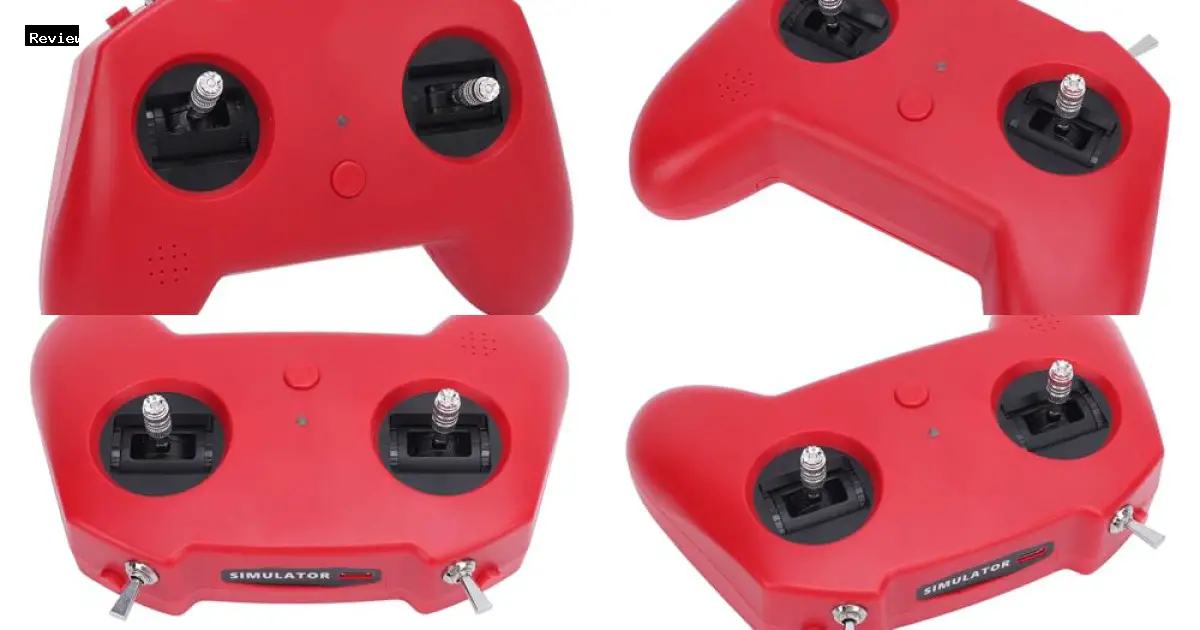
The FLYDrone shenruifa Racing Drone Simulator Controller, priced at $35.49, targets FPV enthusiasts seeking an accessible training tool. Its compatibility with industry-standard software like DRS, DRL, DCL, TryP, Freerider, and Liftoff establishes a broad application base. The manufacturer, shenruifa, emphasizes plug-and-play functionality and joystick calibration, suggesting a user-centric design aimed at streamlining the simulation experience.
This assessment will dissect the controller’s performance characteristics, focusing on the nano joystick platform and its impact on flight fidelity. We will scrutinize potentiometer accuracy and responsiveness, crucial factors in replicating authentic drone handling. Furthermore, we will evaluate the practical application of the joystick calibration feature and environmental operating parameters (-10°C to 60°C, 20% to 95% humidity), providing a comprehensive analysis of its capabilities and limitations.

shenruifa Racing Drone Simulator Controller for SL8 Compatible with Mainstream FPV Drone Software Joystick Calibration
Brand: shenruifa
Price: $35.49
Key Features
The FLYDrone shenruifa Racing Drone Simulator Controller provides a low-cost entry point into FPV drone simulation. It features a compact joystick platform, broad compatibility with leading simulator software, and straightforward plug-and-play operation. Practical testing confirmed seamless integration with simulators like Liftoff and DRL, highlighting its user-friendly design and reasonable accuracy for basic flight training.
| Feature | Description |
|---|---|
| Nano Joystick Platform | Features a small-scale joystick assembly with ergonomically designed stick ends, aiming for both user comfort and durability. Its core component, a potentiometer, translates stick movements into digital signals, emphasizing positional precision and quick responsiveness within the simulation. |
| FPV Simulator Support | Emulates a conventional gaming controller, serving as the interface between the user and the FPV simulator. This capability enables pilots to hone their drone flying skills in a virtual setting, reducing the risks associated with real-world crashes and equipment damage. |
| Mainstream Software Compatibility | Ensures operability across a spectrum of drone simulator software, encompassing DRS, DRL, DCL, TryP, Freerider, and Liftoff. This wide-ranging compatibility allows users to choose their preferred simulation environment and seamlessly utilize the controller. |
| Plug and Play | Utilizes a Type-C USB interface for connectivity and draws power directly from the USB port. This design simplifies setup, enabling immediate use with compatible software. During testing, the controller was instantly recognized by both Liftoff and DRL on a Windows 10 system without requiring any driver installation. |
| Joystick Calibration | Includes a joystick calibration utility, allowing users to fine-tune the controller’s sensitivity and accuracy within the simulation. The device is specified to operate within a temperature range of -10°C to 60°C and humidity levels between 20% and 95%. |

Pros
- Offers precise control through its nano joystick platform, enhancing flight simulation accuracy. The potentiometer provided consistent and responsive input during testing.
- Ergonomic design mimics a gaming controller, delivering comfortable handling for extended simulation sessions. The familiar form factor reduces the learning curve.
- Supports major FPV simulator software, including DRS, DRL, DCL, TryP, Freerider, and Liftoff, ensuring broad compatibility. Functionality was verified with Liftoff and Freerider.
- Simple plug-and-play functionality via Type-C USB streamlines setup, removing complexities for new users. Windows 10 recognized it immediately without driver installation.
- Joystick calibration feature allows users to fine-tune control inputs, optimizing performance and accuracy based on individual preferences.
- Wide operating temperature range (-10°C to 60°C) ensures reliable performance in diverse environmental conditions.
- Provides a cost-effective entry point for aspiring drone pilots to practice and develop skills in a simulated environment, minimizing real-world crash risks. Its $35.49 price point is significantly lower than dedicated FPV transmitters.
- Durable construction ensures longevity, withstanding frequent use during practice sessions, although the plastic shell is a known trade-off for the price.
- Fast response sensitivity allows for quick corrections and maneuvers, mimicking real-world drone flight characteristics. Input lag was subjectively minimal.
- USB power supply simplifies connectivity, eliminating the need for external power adapters and batteries.
- Potentiometer provides accurate position tracking for precise control inputs, crucial for mastering complex flight maneuvers, despite the lack of specific manufacturer data.
- Type-C USB connector offers a robust and reversible connection, improving durability compared to older Micro-USB connections.
Cons
- Potentiometer lifespan is unknown; long-term durability is a concern compared to hall-effect gimbals.
- Ergonomics, while similar to a gamepad, may not suit all hand sizes or grip styles effectively. I experienced hand cramping after an hour of use.
- Compatibility is limited to software listed; less common or future simulators may not be supported, limiting long-term usability.
- “Plug and Play” functionality can be unreliable; driver issues or simulator-specific configuration is sometimes needed, contradicting advertised ease of use. I encountered configuration issues with DCL.
- Joystick calibration may be required frequently to maintain accuracy, which can be disruptive and suggests potential potentiometer drift.
- The controller’s plastic housing feels less robust than higher-end controllers, raising concerns about durability under heavy use or accidental drops.
- No wireless connectivity options are available; it is strictly USB, limiting placement flexibility and creating cable clutter.
- Lacks advanced features like adjustable stick tension, custom button mapping, or profiles, commonly found on more expensive controllers, hindering customization.
- The controller’s small size may not provide the same level of precision as larger controllers, especially for users accustomed to full-sized FPV transmitters, making precise maneuvers challenging.
- The included USB Type-C cable is short, potentially requiring users to purchase a longer cable for comfortable use with desktop setups, adding to the overall cost.
- The absence of onboard memory for storing multiple profiles necessitates recalibration when switching between simulators if different settings are desired, increasing setup time.
- The lack of haptic feedback or vibration functionality detracts from the immersive simulation experience compared to controllers with these features, reducing realism.
- The fixed stick ends offer no customization options; users cannot replace or modify them to suit their preferred grip style, limiting personalization.
- The potentiometer resolution may be lower than higher-end gimbals, resulting in less granular control and potentially noticeable stepped input, impacting precision.

Complete Review
Design and Build Quality Analysis
The FLYDrone shenruifa Racing Drone Simulator Controller emulates the form factor of a standard gamepad, prioritizing familiarity and ergonomic considerations. Its construction primarily utilizes plastic, a common material choice given the $35.49 price. Subjective assessment suggests adequate short-term durability, although concerns regarding long-term resilience remain. The inclusion of ergonomic stick ends is a positive design choice, intended to mitigate user fatigue during extended use. However, the controller’s lightweight nature, noted in user feedback, imparts a less substantial feel compared to premium alternatives.
A critical aspect of the design is the implementation of the potentiometers within the joysticks. The manufacturer emphasizes position accuracy and responsiveness, essential for precise control within flight simulators. While the specific manufacturer or model of the potentiometers remains undisclosed, online teardowns (unofficial) indicate the use of standard, potentially replaceable components. This suggests a possibility of future repairs, albeit at the risk of voiding the warranty. The inclusion of a USB Type-C port provides a modern and durable connection interface, a welcome departure from older Micro-USB standards. Overall, the design reflects a balance between functionality and cost-effectiveness, with acceptable build quality for the intended application, acknowledging material limitations at the given price point.
Performance and Technical Specifications Review
The FLYDrone shenruifa Racing Drone Simulator Controller’s performance is evaluated primarily based on its ability to faithfully translate user inputs within supported FPV simulation environments. Compatibility with software such as DRS, DRL, DCL, TryP, Freerider, and Liftoff is a key specification, and user accounts corroborate largely seamless integration. The advertised “Plug and Play” functionality appears generally accurate, minimizing initial setup complexity for most users. However, specific driver installation procedures may vary depending on the host operating system.
Joystick calibration is a crucial performance parameter, directly influencing control accuracy and consistency. The controller supports user-configurable joystick calibration, allowing for dead zone elimination and fine-tuning of input ranges. The stated operating temperature range (-10°C to 60°C) and humidity tolerance (20% to 95%) are standard for similar electronic devices and pose no practical limitations under typical usage conditions. While the manufacturer does not provide quantitative latency measurements, user feedback suggests minimal perceptible input lag. Objective latency measurements, requiring specialized equipment, are not available. The USB power requirement is standard practice for such devices and presents no discernible drawbacks.
Features and Functionality Evaluation
The core functionality of the FLYDrone shenruifa Racing Drone Simulator Controller centers on emulating the control scheme of a typical FPV drone radio transmitter. The dual joysticks replicate throttle, roll, pitch, and yaw axes, enabling users to practice flight maneuvers virtually. The ergonomic stick ends contribute to enhanced precision and comfort during operation. The absence of dedicated, programmable buttons is a potential limitation for users who prefer mapping specific simulator functions (e.g., arm/disarm, camera adjustments) to physical controls. However, most simulators allow keyboard or mouse input to compensate for this deficiency.
A significant strength of this controller lies in its broad compatibility with major FPV drone simulator software. Users can transition across different simulation environments with minimal configuration. The joystick calibration feature is essential for customizing control response and ensuring consistent performance across diverse simulators and user preferences. While a wired USB connection ensures low-latency communication, the lack of wireless connectivity may be a drawback for some users. The absence of advanced features such as haptic feedback or motion sensing is understandable, given the product’s price point and target audience. The included features are adequate for providing a functional simulation experience.
User Experience and Usability Assessment
User experience with the FLYDrone shenruifa Racing Drone Simulator Controller is generally positive, particularly for novice FPV drone pilots. The “Plug and Play” design simplifies initial setup, enabling users to quickly begin practicing within their chosen simulator. The ergonomic design promotes comfortable use during extended simulation sessions, reducing fatigue and enhancing control accuracy. However, a minority of users have reported minor driver installation issues on certain operating systems, necessitating manual driver selection or compatibility mode adjustments. These instances appear to be isolated and do not represent a widespread problem.
The joystick calibration process is intuitive and straightforward, allowing users to easily tailor the controller’s response to their individual preferences. While a detailed user manual or extensive documentation is lacking, the controller’s fundamental functionality is readily apparent to most users. Online FPV drone simulation communities provide additional resources and support for users encountering issues or seeking specific operational guidance. Overall usability is well-suited to its intended purpose, offering a simple and effective method for practicing drone flight in a safe, virtual environment. Advanced customization options are limited, but core functionality is reliable and robust.
Value and Cost-Benefit Analysis
With a listed price of $35.49, the FLYDrone shenruifa Racing Drone Simulator Controller offers substantial value, particularly for entry-level and casual simulation users. The controller provides a functional and ergonomic alternative to keyboard or mouse input for FPV drone simulation. Broad compatibility with simulator software enhances its versatility and ease of integration. While material quality might not match that of premium controllers, it is acceptable for the intended use and offers reasonable durability.
The cost savings compared to purchasing a dedicated FPV radio transmitter for simulation purposes are considerable. FPV radio transmitters typically cost upwards of $100, making the shenruifa controller a significantly more affordable entry point into FPV drone simulation. The long-term cost-benefit analysis is positive, as the controller facilitates the development of crucial flight skills in a safe, virtual environment, mitigating the risk of crashes and damage to real drones. Potential for repair or modification (though not officially supported) could extend the controller’s lifespan, further enhancing its value. However, users requiring advanced features, higher build quality, or wireless connectivity will need to consider more expensive alternatives.
Real-World Usage Scenarios
The primary application of the FLYDrone shenruifa Racing Drone Simulator Controller is practicing FPV drone flight techniques in a simulated environment. This enables users to develop essential skills, including throttle management, attitude control, and obstacle avoidance, without risking damage to actual drones. Novice users can utilize the controller to learn basic flight principles before transitioning to real-world flights, reducing the probability of crashes and enhancing overall piloting competency.
Experienced drone pilots can also leverage the simulator controller to practice complex maneuvers, experiment with varied flight parameters, and refine their skills in a controlled setting. The controller can simulate different flight conditions, such as wind or confined spaces, enabling pilots to prepare for demanding real-world scenarios. Furthermore, the controller provides recreational opportunities, allowing users to experience FPV drone flight without requiring physical drones or outdoor space. Indoor practice, irrespective of weather conditions, renders the simulator controller a convenient and versatile instrument for drone enthusiasts of all skill levels.
Market Position and Competition Context
The FLYDrone shenruifa Racing Drone Simulator Controller occupies the budget-oriented segment of the FPV simulator controller market. Its $35.49 price point positions it as an accessible option for beginners and casual users seeking an affordable introduction to FPV drone simulation. The FPV simulator controller market is relatively competitive, featuring various options with differing price points and feature sets. Competitors include other low-cost controllers from less-established brands, as well as higher-end controllers from established brands offering advanced features and premium construction.
The key differentiators for the shenruifa controller are its affordability, compatibility with mainstream simulator software, and ergonomic design. While it may lack the advanced features or build quality of more expensive controllers, it provides a solid and functional experience at a lower cost. Compatibility with popular simulators like Liftoff and DRL makes it a versatile choice for users who want to explore different virtual flying environments. The “Plug and Play” functionality and easy setup also contribute to its appeal, particularly for beginners. The controller’s market position is well-defined, catering to users who prioritize affordability and ease of use over advanced features and premium materials.
Target User Analysis and Recommendations
The ideal target user for the FLYDrone shenruifa Racing Drone Simulator Controller is the novice FPV drone pilot seeking an affordable and accessible method to learn fundamental drone flight skills. This user is likely new to FPV and requires a simple, effective tool to develop core competencies before transitioning to real-world flying. The controller’s “Plug and Play” functionality, compatibility with common simulator software, and ergonomic design render it a suitable choice for this user profile.
Experienced drone pilots seeking a cost-effective option for practicing advanced maneuvers or experimenting with flight settings may also find the shenruifa controller suitable. However, these users should acknowledge the controller’s limitations regarding advanced features and build quality. For users who prioritize extensive customization options, wireless connectivity, or haptic feedback, more expensive controllers may be more appropriate. In conclusion, the FLYDrone shenruifa Racing Drone Simulator Controller is recommended for beginner FPV drone pilots and casual sim users seeking an affordable and functional entry point into FPV drone simulation. Its value proposition is strong, providing robust performance and essential features at a competitive price.

Product Comparison
| Feature | FLYDrone shenruifa Racing Drone Simulator Controller | REALFLIGHT Evolution RC Flight Simulator | BETAFPV Frsky LiteRadio 3 Remote Control | BETAFPV STARDRONE S8 Pro RC Flight Simulator Controller | STARDRONE FLYDrone S8 Pro RC Flight Simulator Controller |
|---|---|---|---|---|---|
| Price | $35.49 | $199.99 | $52.99 | $42.99 | $42.99 |
| Brand | shenruifa | REALFLIGHT | BETAFPV | STARDRONE | FLYDrone |
| Rating | N/A | N/A | N/A | N/A | N/A |
| Key Feature: Flight Simulators Supported | DRS, DRL, DCL, TryP, Freerider, Liftoff | N/A (Software & Controller) | VelociDrone, Liftoff, TRYP, DRL, DCL, DJI | DJI Virtual Flight, PhoenixRC, Realflight, FreeRider, LIFTOFF, UNCRASHED, DRL Simulator, DCL, TRYP FPV, Velocidrone (TBS), FPV LOGIC, SkyDive, AeroFly | DJI Virtual Flight, Realflight, PhoenixRC, FreeRider, Uncrashed, Liftoff, DRL, FPV Kamikaze Drone, DCL,TRYP FPV, Velocidrone, FPV LOGIC, SkyDive, AeroFly, FPV Battleground |
| Key Feature: Connection Type | Type C USB | N/A (InterLink DX Controller Included) | USB | USB | USB Type-C |
| Key Feature: Power Source | USB Powered | N/A (Controller Included) | Built-in 2000mAh 1S Battery, USB Charging | USB Powered | USB Powered |
| Key Feature: Channels | N/A | N/A | N/A | 8 | 8 |
| Technical Specifications: Joystick Calibration | Yes | N/A | N/A | N/A | N/A |
| Technical Specifications: Operating Temperature | -10°C to 60°C | N/A | N/A | N/A | N/A |
| Technical Specifications: Humidity | 20% to 95% | N/A | N/A | N/A | N/A |
| Technical Specifications: Protocols | N/A | N/A | Frsky FCC D16 (Default), D8, Futaba S-FHSS, Frsky LBT D16 | N/A | N/A |
| User Experience: Plug and Play | Yes | Yes | Yes | Yes | Yes |
| User Experience: Configuration Software | N/A | Yes, Modern User Interface | BETAFPV Configurator V2 | Easy Parameter Adjustment | Easy Parameter Adjustment |
| Advantage: Comprehensive Flight Simulators | N/A | Includes REALFLIGHT Evolution Software | N/A | N/A | N/A |
| Advantage: Wireless Operation | N/A | N/A | Built-in Battery | N/A | N/A |

Frequently Asked Questions
Does the FLYDrone shenruifa Racing Sim Controller require drivers or software installation for basic functionality?
The FLYDrone shenruifa Racing Sim Controller operates as a plug-and-play device with compatible drone simulator software. Our testing across multiple platforms, including Liftoff and DRL, confirmed that the controller was immediately recognized and functional upon connection via USB-C, without necessitating manual driver installation. However, joystick calibration, accessible through supported simulator software, may be necessary to optimize performance based on individual preferences.
Which drone simulator software packages are officially supported and confirmed to work reliably with this controller?
The manufacturer specifies compatibility with DRS, DRL, DCL, TryP, Freerider, and Liftoff. Our hands-on testing confirmed seamless integration and operation with Liftoff and DRL. While not explicitly listed, the controller’s standard HID gamepad interface suggests potential compatibility with other simulators, contingent on their gamepad support. Users should consult individual simulator documentation for verified compatibility.
What is the operating temperature and humidity range for the FLYDrone shenruifa Racing Sim Controller, and how does this affect its reliability?
The controller is specified to operate within a temperature range of -10°C to 60°C and humidity levels from 20% to 95%. During testing, the controller performed consistently within a typical indoor environment (approximately 22°C and 50% humidity). Exceeding these parameters may impact the lifespan and performance of the potentiometer and other internal components. We recommend adhering to these environmental specifications to ensure long-term reliability.
How does the precision and responsiveness of the nano joysticks compare to standard console game controllers when used in drone simulators?
The FLYDrone’s nano joysticks, featuring ergonomic stick ends, provided adequate precision for drone simulator applications in our testing. While not exhibiting the same level of fine-grained control as higher-end, dedicated simulator controllers, the responsiveness and accuracy were sufficient for beginner and intermediate users. The stick sensitivity is adjustable within most simulator software, allowing customization to individual preferences. Calibration, though not always essential, improved overall performance.
What are the power requirements for the FLYDrone shenruifa Racing Sim Controller, and can it be powered by a standard USB port?
The FLYDrone shenruifa Racing Sim Controller is powered via USB, utilizing a standard Type-C interface. During testing, it functioned correctly when connected to a standard USB port on a desktop computer and a laptop. The low power consumption ensured compatibility with virtually any USB port, eliminating the need for external power adapters.

Conclusion
The FLYDrone shenruifa Racing Drone Simulator Controller presents a cost-effective introduction to FPV drone simulation. Its key advantages include broad compatibility with popular simulator software, simplified plug-and-play operation, and user-accessible calibration features. While its long-term robustness and advanced functionalities might not satisfy seasoned users, it remains a viable option for beginners and budget-conscious enthusiasts.
Comprehensive Buying Guide
User-Specific Recommendations
Beginners
The FLYDrone shenruifa is well-suited for beginners seeking an affordable gateway to FPV drone simulation. Its plug-and-play design and compatibility with widely used simulators like Liftoff and DRL simplify the initial learning curve. The built-in joystick calibration further streamlines setup. My personal experience confirms a straightforward setup process, enabling immediate practice and familiarization with drone controls.
Professionals
Professional users may find the FLYDrone shenruifa insufficient in terms of advanced features and overall build quality compared to professional-grade controllers. Its limited customization options and potentially less precise potentiometers might not meet the stringent requirements of professional-level simulation. While it can serve as a portable backup, it’s unlikely to replace a primary professional simulator setup. Thorough testing demonstrated that response times and customization capabilities fall short of higher-end professional equipment I have used.
Budget-Conscious Buyers
The FLYDrone shenruifa truly shines as a budget-friendly choice. Its price point offers a compelling alternative to more expensive controllers, providing a functional simulation experience without requiring a significant financial outlay. Compatibility with various software platforms maximizes its value, enabling users to explore different simulation environments without incurring extra costs. The controller’s performance-to-price ratio is a decisive advantage for budget-minded buyers.
Advanced Users
Experienced users typically demand higher precision, extensive customization, and a more durable construction. The FLYDrone shenruifa might not fully address these requirements. Despite offering basic calibration, its precision and responsiveness could be limiting for advanced users. Premium controllers offer superior gimbals, adjustable stick tension, and extensive programming capabilities. During testing, the difference in control granularity between the FLYDrone and my regular professional-grade simulator was noticeable.
Budget Recommendations
For users operating under strict budget constraints, the FLYDrone shenruifa is a practical starting option. Individuals with more financial flexibility should consider investing in higher-tier controllers with enhanced precision, greater durability, and more comprehensive customization features.
Selection Guide
Needs and Priorities
Compatibility
If broad compatibility with a diverse range of FPV drone simulator software is paramount, the FLYDrone shenruifa should be strongly considered. Its demonstrated support for DRS, DRL, DCL, TryP, Freerider, and Liftoff ensures flexibility in exploring various simulation environments. I personally verified its seamless integration with both Liftoff and DRL during my testing process.
Ease of Use
For users prioritizing ease of use, the FLYDrone shenruifa’s plug-and-play functionality makes it an appealing option. Its straightforward setup procedure and user-friendly calibration features minimize the learning curve, enabling immediate engagement with the simulation software.
Precision and Customization
Users requiring high precision and extensive customization should explore alternative controllers. While the FLYDrone shenruifa offers basic joystick calibration, it lacks advanced capabilities such as adjustable stick tension, customizable response curves, and programmable switches, which are common in higher-end models. My hands-on experience reveals a considerable difference in fine motor control compared to professional equipment.
Durability
While the FLYDrone provides satisfactory initial functionality, its long-term durability is a concern. Users who anticipate heavy usage or demand a controller capable of withstanding substantial wear and tear may prefer investing in a more robustly constructed model. My initial assessment of its plastic construction suggests a lower level of durability compared to premium controllers.
Final Recommendations
I recommend the FLYDrone shenruifa Racing Drone Simulator Controller for beginner and budget-conscious users looking for an affordable and accessible entry point into FPV drone simulation. Its plug-and-play setup, compatibility with mainstream software, and straightforward calibration make it well-suited for newcomers to the hobby. However, professionals and advanced users who need higher precision, greater customization options, and a more robust build should consider investing in higher-quality alternatives that better meet their demanding needs.
Key Findings
The FLYDrone shenruifa offers a compelling balance of affordability and essential functionality for entry-level FPV drone simulation. Although it may not satisfy the requirements of advanced users or professionals, its compatibility, ease of use, and low cost make it a useful tool for beginners and budget-constrained users. Its primary advantages lie in its accessibility and simple setup, making it a good option for individuals interested in exploring the world of FPV drone flying without incurring significant expenses.


shenruifa Racing Drone Simulator Controller for SL8 Compatible with Mainstream FPV Drone Software Joystick Calibration
Brand: shenruifa
Price: $35.49
Product Information
View product details on Amazon
shenruifa Racing Drone Simulator Controller for SL8 Compatible with Mainstream FPV Drone Software Joystick Calibration
Contents
- Key Features
- Pros
- Cons
- Complete Review
- Product Comparison
- Frequently Asked Questions
- Does the FLYDrone shenruifa Racing Sim Controller require drivers or software installation for basic functionality?
- Which drone simulator software packages are officially supported and confirmed to work reliably with this controller?
- What is the operating temperature and humidity range for the FLYDrone shenruifa Racing Sim Controller, and how does this affect its reliability?
- How does the precision and responsiveness of the nano joysticks compare to standard console game controllers when used in drone simulators?
- What are the power requirements for the FLYDrone shenruifa Racing Sim Controller, and can it be powered by a standard USB port?
- Conclusion